
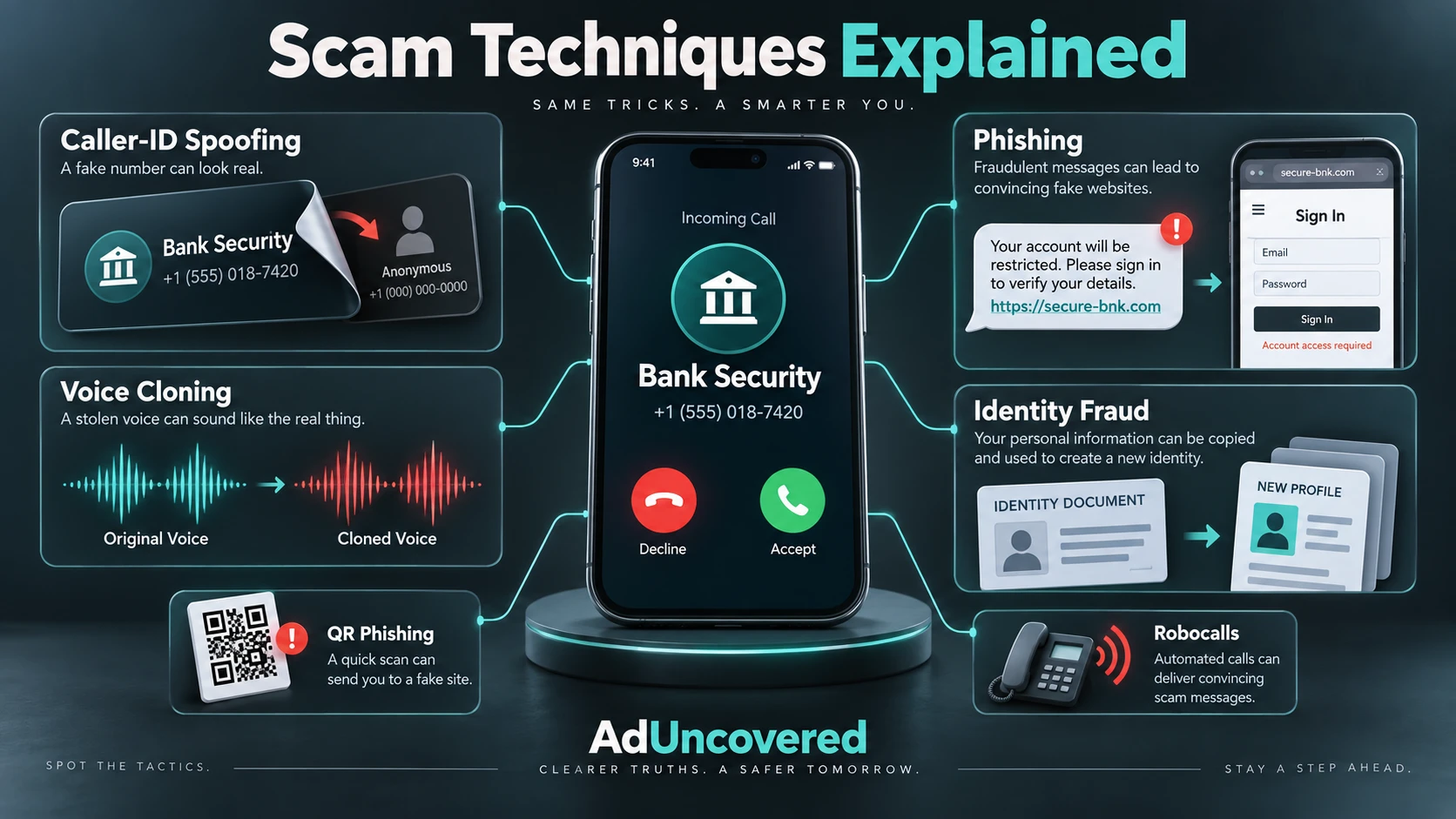
How Scammers Steal Your Identity, Impersonate Trusted People and Reach Your Money
Scam Techniques Explained: How to Protect Yourself
Scam techniques often work together: a fraudulent message can lead to a telephone call, a fake login page, an account takeover and finally a payment. Understanding these methods helps you recognise suspicious requests and protect your identity, accounts and money.
Scammers do not rely on one technique. A fraudulent message can lead to a telephone call, a fake login page, an account takeover and finally a payment. The story changes, but the objective remains similar: persuade you to reveal information, grant access or move money.
This guide covers the principal documented methods and newer developments reviewed on 9 October 2026. No list can capture every variation. Some techniques are established in South African banking warnings; others are documented internationally and should not be mistaken for evidence of their local prevalence.
Established Methods
Identity theft and identity fraud. Criminals obtain personal information and use it to impersonate someone, apply for credit or support another deception. A caller knowing your name or identity number is not proof that they work for your bank. South Africa’s SAFPS offers Protective Registration and assistance for victims of impersonation. SAFPS guidance
Phishing, smishing and vishing. Phishing commonly uses deceptive emails or websites; smishing uses text messages; vishing uses calls or voice messages. The lure may be a blocked account, suspicious purchase, parcel payment or refund. A targeted version, spear phishing, uses details about your work or circumstances to make the message more persuasive. Microsoft’s phishing guidance
Caller-ID, email and website spoofing. Spoofing disguises the apparent source of a communication. A displayed bank number, familiar sender name or convincing website design can create false reassurance. Standard Bank’s March 2026 warning describes criminals combining caller-ID spoofing, impersonation and AI-assisted deception. Standard Bank warning
Fake bank security and “safe account” instructions. The caller claims your money is threatened and tells you to transfer it, disclose credentials or approve an action to protect it. You may personally authorise the payment while being deceived about its purpose. FNB warns against calls requesting banking information or remote-access installation. FNB’s current scam guidance
Auto-diallers and robocalls. An auto-dialler places calls automatically; a robocall delivers a recorded message. Both have legitimate uses, but criminals can use them to reach people cheaply and repeatedly. A recorded “fraud alert” may ask you to press a key or disclose information. A US credit union documented calls impersonating its own number and announcing an attempted purchase. That is a documented overseas example, not a South African prevalence estimate. Natco warning
SIM swaps and account takeover. A fraudulent SIM swap can redirect your number to a criminal-controlled SIM, exposing services that depend on SMS or telephone verification. Other takeovers begin with stolen passwords or deception. FNB’s guidance includes SIM-swap-related scam messages and account-security impersonation. FNB guidance
Remote-access and technical-support scams. A supposed bank employee or technician asks you to install software or share your screen. Legitimate support tools can then be abused to observe information or control a device. Installing an application because an unsolicited caller instructs you to is particularly dangerous. FNB warning
Business email compromise and payment diversion. Criminals impersonate an executive or supplier, sometimes through a compromised real account. They request an urgent payment or substitute banking details in a genuine business conversation. Familiar wording and an existing email thread do not establish that changed payment instructions are authentic. Microsoft’s 2026 threat research
Relationship, investment and advance-fee schemes. Fraudsters build trust before introducing an investment or asking for money. A fake investment platform may display fabricated gains, then demand additional “tax”, clearance or withdrawal payments. Advance-fee schemes similarly promise a larger benefit after an upfront payment. FBI investment-fraud guidance, advance-fee guidance
Money-mule recruitment and recovery scams. A supposed job or relationship asks you to receive and forward money, potentially involving you in laundering stolen funds. After a loss, another criminal may promise recovery for a fee. An offer to “get everything back” can begin a second scam. FBI money-mule guidance, recovery-fraud warning
Newer Tools and Evolving Techniques
AI-generated messages, identities and endorsements. Criminals can generate convincing text, profile images, documents and videos. Better grammar and professional presentation are no longer useful assurances of authenticity. The FBI documents AI-generated content being used to support financial deception; its findings are international, not South African incidence figures. FBI AI-fraud warning
Voice cloning and deepfake video. A familiar voice can be synthesised from recorded audio, including material posted publicly. It may impersonate a relative in an emergency or a senior colleague requesting payment. A voice or video that seems recognisable should not bypass independent verification. FTC voice-cloning warning
Do robocalls collect voices for cloning? A deceptive call could obtain recorded speech, but the sources reviewed do not establish that ordinary robocalls routinely harvest South Africans’ voices for cloning. Public recordings provide another possible source. Answering once, saying “hello” or pressing a key is not, by itself, evidence that your identity or bank account has been compromised. Voice cloning is a real capability; a universal robocall-to-cloning pipeline is not an established fact.
QR-code phishing, or quishing. A QR code in an email, document or other message can conceal a link to a credential-stealing site. Scanning it on a phone may move the interaction away from workplace email protections. Treat the destination as an unverified link, not as trustworthy because it came through a QR code. Microsoft’s phishing guidance
Session theft and adversary-in-the-middle phishing. Some attacks intercept a legitimate sign-in process and capture authenticated sessions. This helps explain why entering a password and successfully completing conventional MFA does not make every subsequent interaction safe. These are documented international attack techniques, not proof that every South African banking application is vulnerable. Microsoft’s AiTM research
Device-code phishing. A message persuades you to enter an attacker-supplied code on a genuine authentication page, potentially authorising the attacker’s access. The login page can be real while the instruction that brought you there is fraudulent. Microsoft documented such a campaign in February 2025. Microsoft’s device-code investigation
Fake verification and computer-repair prompts. ClickFix-style attacks persuade people to perform dangerous actions disguised as a CAPTCHA, update or repair. Microsoft’s August 2026 TerminalFix investigation describes a campaign using fake verification instructions to induce malware installation. A website should not require you to paste unfamiliar commands into a system tool to prove you are human. Microsoft’s TerminalFix investigation
Workplace-platform impersonation and automation. Threats also arrive through collaboration platforms rather than email alone. Microsoft’s July 2026 report describes Teams-based social engineering and automated, multi-stage campaigns. The important development is the combination of trusted channels, convincing impersonation and automation, not simply “more AI”. Microsoft’s Q2 2026 findings
How to Protect Yourself
Screen calls, but verify the caller separately. Your phone can create a useful pause before you engage. However, someone saying “I am from your bank’s fraud department” is making a claim, not passing an identity check. A plausible screening response is not permission to disclose information or transfer money.
iPhone: On supported software, open Settings > Apps > Phone > Screen Unknown Callers > Ask Reason for Calling. This asks an unsaved caller why they are calling before your phone rings. Apple also provides options to silence unknown callers and filter spam. Apple notes that screening does not operate while roaming and temporarily switches off after an emergency-services call. Apple’s official instructions
Samsung Galaxy: Samsung documents Phone > three-dot menu > Settings > Call screening, including an automatic-screening option on compatible devices running Android 16 and One UI 8.5 or later. These instructions come from Samsung’s US support site; they do not guarantee availability on every South African handset. Separately, Samsung South Africa documents Caller ID and spam protection, powered by Hiya, with availability varying by country and device. Samsung screening instructions, Samsung South Africa Smart Call
Google Pixel: Google offers automatic and manual Call Screen in specified countries. South Africa is not on its currently published availability lists. Do not assume that buying a Pixel locally will provide that feature. Google’s availability and setup guidance
Other Android phones: Where the handset supports Phone by Google, check Phone > Settings > Caller ID and spam for identification and filtering options. The phone make alone does not determine availability: the installed dialler, software and region matter. Spam identification is different from an assistant asking callers their reason. Google’s spam-protection instructions
Use independent verification. End a suspicious call and open your banking application yourself, or use contact details obtained independently from the bank. For a family emergency, call the person on their usual number or contact another trusted relative. Agree on a private family verification phrase, but do not rely on it as your only protection. FTC guidance
Protect accounts and devices. Use unique passwords, a password manager and MFA; choose phishing-resistant authentication where available. Reject unexpected approvals. Keep software updated and do not install tools at an unsolicited caller’s instruction. On iPhone, consider Stolen Device Protection to add safeguards if someone steals the device and knows its passcode. CISA account-security guidance, Apple’s device-protection guidance
Protect your identity and business payments. Share identity documents only where genuinely necessary and through verified channels. If your identity documents are lost or misused, investigate SAFPS Protective Registration. Businesses should independently confirm changed supplier details and require a second approval for sensitive payments, including requests apparently coming from senior management. SAFPS, Microsoft’s business-fraud guidance
Act immediately after suspected fraud. Stop contact and further payments, notify your bank through official channels, secure affected accounts and preserve evidence. Follow What to Do Immediately After Being Scammed. Where an identifiable seller or offer is involved, an AdUncovered Comprehensive Report can examine public evidence and relevant transaction information. It does not replace urgent bank action or guarantee recovery.
The most useful protection is not learning to recognise every fake voice or memorising every scam name. It is refusing to let an unexpected call, message or apparent authority bypass your normal verification process.
Scam Techniques Explained
Some terms describe how criminals contact you; others describe how they steal information, gain access or persuade you to pay. Several may be combined in one scam.
| Technique | What It Is |
|---|---|
| Social engineering | Manipulating someone through trust, fear, urgency or authority into revealing information or taking an unsafe action. |
| Identity theft and identity fraud | Obtaining someone’s personal information and using it to impersonate them, apply for credit or support another deception. |
| Phishing | Deceptive messages or websites designed to steal information, deliver malware or persuade someone to act. |
| Smishing | Phishing delivered through SMS or other text messages. |
| Vishing | Voice-based deception through telephone calls or voice messages. |
| Spear phishing | A targeted phishing attempt tailored to a particular person or organisation. |
| Caller-ID spoofing | Disguising the displayed calling number so it appears to belong to a trusted organisation or person. |
| Email spoofing | Falsifying a message’s apparent sender. This differs from using a genuinely compromised email account. |
| Website impersonation | Creating a lookalike website that imitates a bank, retailer or other trusted service. |
| Auto-dialling | Automatically placing calls, sometimes connecting answered calls to a person. It has legitimate uses but can also support scams. |
| Robocalling | Delivering a prerecorded telephone message. A recording or keypad menu does not establish whether the call is legitimate. |
| Voice cloning | Using AI to generate speech resembling a particular person from recorded audio. A robocall does not automatically clone the recipient’s voice. |
| Deepfake video | Generated or manipulated video that makes someone appear to say or do something they did not. |
| AI-assisted impersonation | Using generated messages, images, documents or audio to make a false identity or story more convincing. |
| SIM-swap fraud | Fraudulently transferring a victim’s mobile number to another SIM, potentially intercepting calls and SMS verification codes. |
| Account takeover | Gaining control of an existing account through stolen credentials, intercepted verification or other compromise. |
| Remote-access abuse | Persuading someone to grant access to a device, then abusing that access to observe information or control actions. |
| Technical-support impersonation | Pretending to be a technician or support agent to obtain payment, information or device access. |
| Bank-security impersonation | Pretending to represent a bank’s fraud team and using a supposed security emergency to obtain information or payments. |
| “Safe account” deception | Claiming money must be moved to another account for protection, when the destination is controlled by criminals. |
| Business email compromise | Using an impersonated or compromised business account to manipulate payments or obtain sensitive information. |
| Payment diversion | Substituting criminal-controlled payment details for those of the intended recipient. |
| QR-code phishing, or quishing | Using a QR code to direct someone to a deceptive website or another unsafe destination. |
| Adversary-in-the-middle phishing | Interposing a malicious service in a genuine sign-in process to capture credentials or authenticated sessions. |
| Session theft | Stealing an authenticated session token or cookie, potentially allowing access without repeating the normal login process. |
| Device-code phishing | Tricking someone into entering an attacker-supplied code on a genuine authentication page, thereby authorising unwanted access. |
| ClickFix and TerminalFix | Fake verification or repair instructions that persuade someone to run commands which install malware or enable intrusion. |
| Relationship and romance fraud | Building a false friendship or romantic relationship to obtain money, information or cooperation. |
| Investment-platform fraud | Presenting a fraudulent investment service, often with fabricated balances or profits, to encourage further payments. |
| Advance-fee fraud | Requiring an upfront payment to obtain a promised benefit that does not materialise. |
| Money-mule recruitment | Recruiting someone to receive and forward criminal proceeds, sometimes disguised as employment or a personal favour. |
| Recovery fraud | Targeting someone who has already lost money with a false promise of recovery, usually requiring fees or further access. |
Definitions draw on Microsoft’s phishing guidance, FNB’s scam warnings, FTC voice-cloning guidance, and the linked sources in the article. Inclusion does not mean every technique is equally common in South Africa.
Check before you pay
About to pay a seller or business you don’t know? Start with a Free Quick Check of the advert link. It screens for common warning signs and shows where each result came from.
If you need the seller researched, a Quick Report or Comprehensive Report brings together source-linked Search Results on the seller and the offer. Neither gives a verdict: you check the sources and decide for yourself.